Field service and engineering
Software for firms with engineers out on customer sites
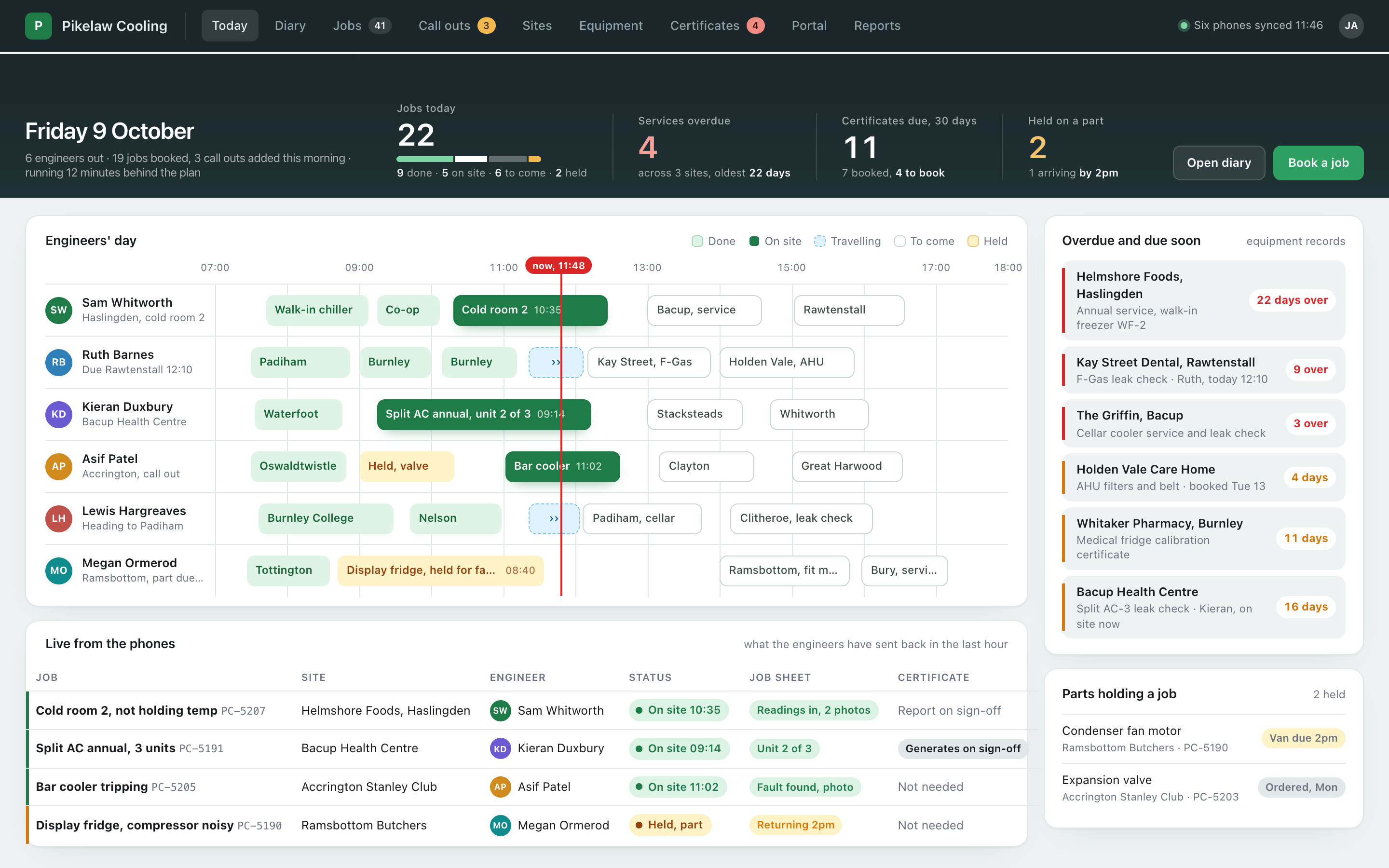
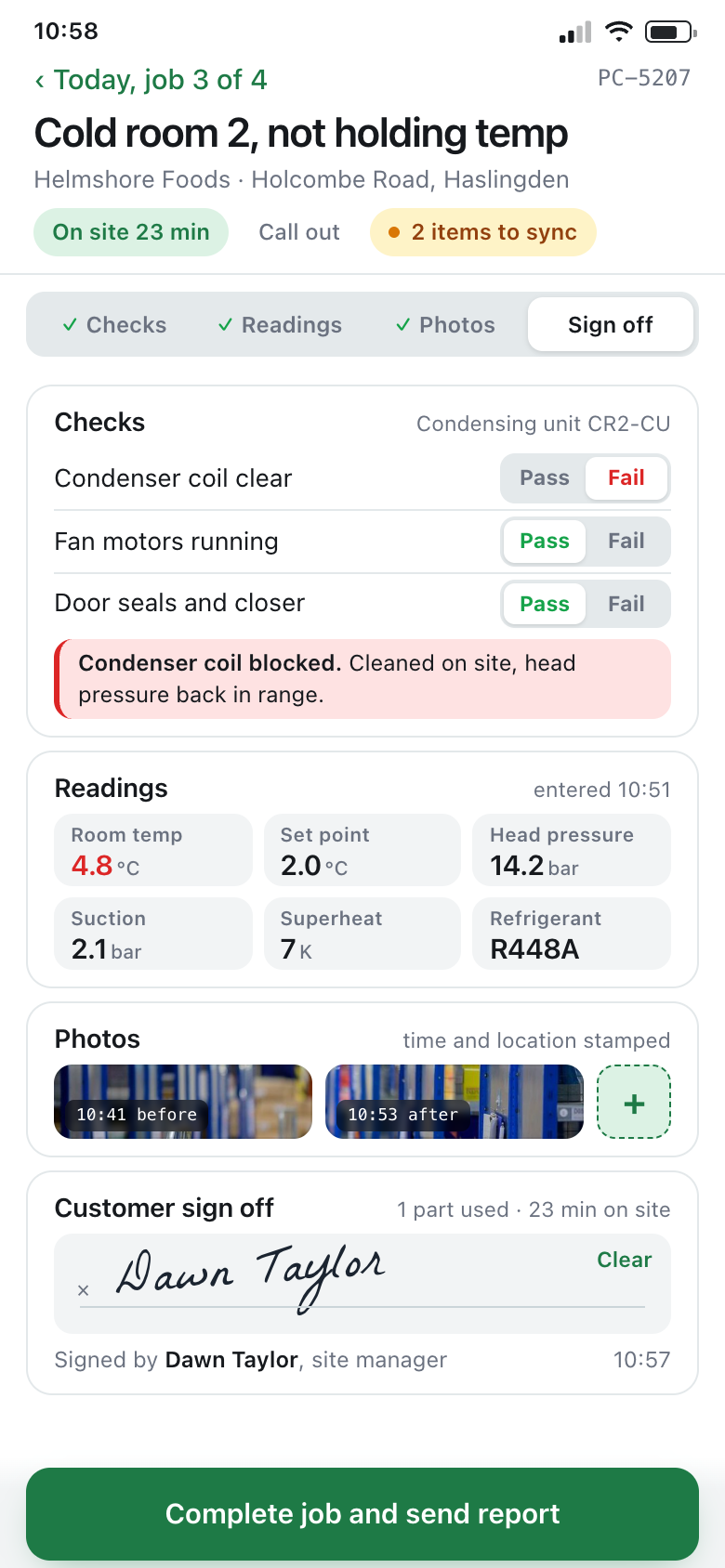
The office board and the engineer's phone showing the same job. Who is where, the job sheet filled in on site with readings, photos and a signature, and the certificate generated from what was entered rather than typed up afterwards. Built around how your firm already works, hosted in the UK, and looked after by the people who built it.
What a field service firm actually tracks
Six records, one visit
- The job: planned service, call out or install, and who it is booked to
- The customer's sites and the equipment on each of them
- The job sheet: checks, readings, faults found and what was done
- Photos, parts used and the customer's signature
- Certificates and test records, and when the next one is due
- Hours on site and on the road, booked to the job
Six records describing the same visit, usually kept on a clipboard, a phone and a spreadsheet.
A field service system answers "where is Sam, has the Haslingden job been done, and has the certificate gone out" without ringing the van. One visit is one record: the job, the equipment it was for, what the engineer found, what they did and what they signed off.
Plenty of firms run this on a diary, paper job sheets and photos sent over WhatsApp, and it got them this far. Plenty more have a field service package that covers the bookings and a spreadsheet for the service due dates. The question is whether the record is written on site while the engineer is stood in front of the equipment, or pieced together in the office on Friday.
A first system might be the day board and a job sheet on the engineers' phones. The same system two years on can carry every customer's equipment register, the certificates generated from each visit and a portal where customers fetch them.
What you would be looking at, in the order a day happens
Three screens from our own example system. Real screens rather than mock-ups. The firm in them, Pikelaw Cooling Services of Rossendale, is invented, and so is every customer, site, engineer and reading. Yours would carry your job numbers, your checks and your words for things.

The day to day, in more detail
| Planned work and call outs | Planned services come off the equipment's own due dates and go in the diary. Call outs are booked against the customer and site, given to an engineer, and sit on the same board with the same statuses. |
|---|---|
| Job sheets built for the work | Each type of job has its own sheet: the checks it needs, the readings it asks for, sections that only appear when a check fails, and items that repeat for each unit at a site. Required items cannot be skipped. |
| Readings and test results | Entered as numbers against the equipment, so a reading out of range is flagged on the spot and the history is there the next time somebody visits. |
| Photos and sign off | Photos stamped with the time and location, before and after. The customer signs on the engineer's phone and gets the report by email before the van has left. |
| Parts used | Booked against the job from van stock or the stores, so the invoice carries the parts that were fitted and the van stock stays right. |
| Time on the job | Clock in and out on arrival and departure, with location, so hours land on the job and the timesheet without a separate form. |
| Certificates generated and sent | The certificate or report is produced as a PDF from the completed sheet, in your layout, filed against the equipment and sent to the customer. Nobody types it up. |
| Customers fetching their own | A portal login that shows a customer their sites, their equipment, what is due and every certificate, so the request for last year's paperwork answers itself. |
The paperwork side of it, plainly
Most of what an engineer produces on site has to be findable later, by equipment and by date. The system holds it against the item it was done on and works the next date out from it.
| F-Gas records | For each system holding refrigerant: the gas and charge, the CO2 equivalent, the leak check interval that follows from it, each check with its result and the engineer who did it, and any gas added or recovered. Kept against the equipment, which is where an inspector asks for it. |
|---|---|
| Thorough examinations and LOLER | Lifting equipment with its examination interval, each examination recorded and the report generated, and the next date set from the last one rather than from memory. |
| Calibration certificates | The reference used, the readings before and after adjustment, the tolerance and whether it passed, on a certificate with a number of its own that the customer can find again. |
| Electrical test certificates and pressure tests | The test results entered on site as numbers, checked against the limits as they go in, and the certificate produced from them when the job is signed off. |
We build the records, not the compliance advice. No system makes a firm compliant on its own. Check your own obligations under the F-Gas regulations, LOLER and the rest with the relevant body or your trade association.
Who it suits, and who it doesn't
Where this kind of system earns its keep
- Refrigeration and air conditioning, glazing and locks, electrical and mechanical services, lift and door servicing, energy and EV installers
- Equipment testing and calibration firms that issue certificates
- Somewhere between 5 and 100 people, with engineers on the road most days
- Customers with several sites and equipment on each that comes due
- Engineers who need the office's picture, and an office that needs theirs
Where we fit best
A firm with two engineers can run on a diary and a group chat for a long time. The system earns its keep once several engineers are out at once, certificates have to go out the same day and the due dates matter, and a first step can be the job sheet on the phone on its own.
If a field service package already runs your bookings and everybody uses it, keep it. We build what still sits beside it, the job sheets, test records and certificates it was never built for, and join the two where it allows.
Where it saves time, we build in AI features too: a supplier's invoice or a scanned test sheet read into the record and checked against the job, or a service report drafted from the readings for the engineer to approve. More on AI and automation.
Usually built alongside iPhone and Android apps for engineers, asset and equipment registers, compliance and inspection records, scheduling and run sheets, customer portals or forms, e-signatures and documents. Firms that hire out equipment will find plant hire closer to home, and the rest are on the services page.
Ask about our free Business Systems Assessment
An hour with whoever runs the day to day. Clear recommendations to act on.
We look at how the work actually runs and what it runs on, then send you a list of what we would change, what each change would do for the business, and what it would take. In person or online, whichever suits you. Nothing to pay, nothing to sign.
- One hour
- In person or online
- Recommendations we talk you through
Honest answers
- Our engineers won't use another app.
- They already carry a phone and already take photos and send messages about the job. The point is that this one is quicker than the clipboard and the group chat: the checks for that equipment, a few taps, two photos, a signature, done. If it takes longer than the paper sheet, it is built wrong and we change it.
- There's no signal in half the plant rooms we work in.
- The app keeps working without one. The sheet, the photos and the signature are stored on the phone and sent when it finds a signal again, and the engineer can see what is still waiting to go. The office sees the job update when it arrives, not before.
- We already have a field service package.
- Then it carries on doing what it does well. What we usually build is the part it does not do for your trade: the job sheet with your checks on it, the test records, the certificates in your layout, the customer's equipment register. Where the package has an interface, the two are joined so jobs are not typed twice.
- Can customers download their own certificates?
- Yes, with their own login that shows their sites, their equipment and their documents and nothing else. A certificate is in their portal the moment it is issued, and you can see whether they have looked at it.
- How long does it take?
- A first system is usually live in weeks rather than months, and bigger ones go live in pieces so the useful part arrives early. The engineer app is published to the App Store and Google Play under your own name. Scope, price and dates are agreed in writing before anything starts, with what is not included written as plainly as what is. More on that in how we work.
- Where does the data live?
- On UK hosting, backed up every night with the backups kept for thirty days, and monitored every few minutes. The details are on hosting and support.
Talk to us
Tell us how jobs reach your engineers now, what they fill in on site and what has to go to the customer afterwards. That is usually enough to say whether we can help.
Ring, 8am to 6pm Monday to Friday and Saturday mornings, or use the form below. Pick what you'd like to keep track of, add a line if you want to, and leave a name and a way to reach you.