Systems we build and run
Mobile apps for drivers, engineers and site teams
The people who do the work carry the app. The office sees each stop, check and finished job as it happens, on the same system it already uses. iPhone and Android, built and looked after by the team that builds the office side.

Who carries it
People who are out more than in
- Drivers on a run of deliveries and collections
- Engineers and fitters on call-outs and installs
- Inspectors going room by room or asset by asset
- Site teams logging hours, materials and progress
- Production staff recording checks on the floor
If somebody fills in a sheet that comes back to the office at the end of the day, that sheet is usually the first screen of the app.
A field app is the office system, cut down to what one person needs while they're standing next to the work. Today's jobs, the check in front of them, and a button that says it's done.
A driver doesn't need the customer list or the invoice screen, so they never see them. What they do see has big buttons and little typing, because it gets used in a cab, in a loft or in the rain.
The office keeps the full picture. Whatever is entered on the phone lands on the same record the office is looking at, so nobody types it in twice and nobody waits for the paperwork to come back.
What they do on it
The usual jobs a field app takes over. Most apps start with one or two and pick up the rest later.
Run sheets
Today's stops in order, with the address, the contact and any note from the office. Ticked off as each one is done, and changes from the office appear without a phone call.
Walk round checks
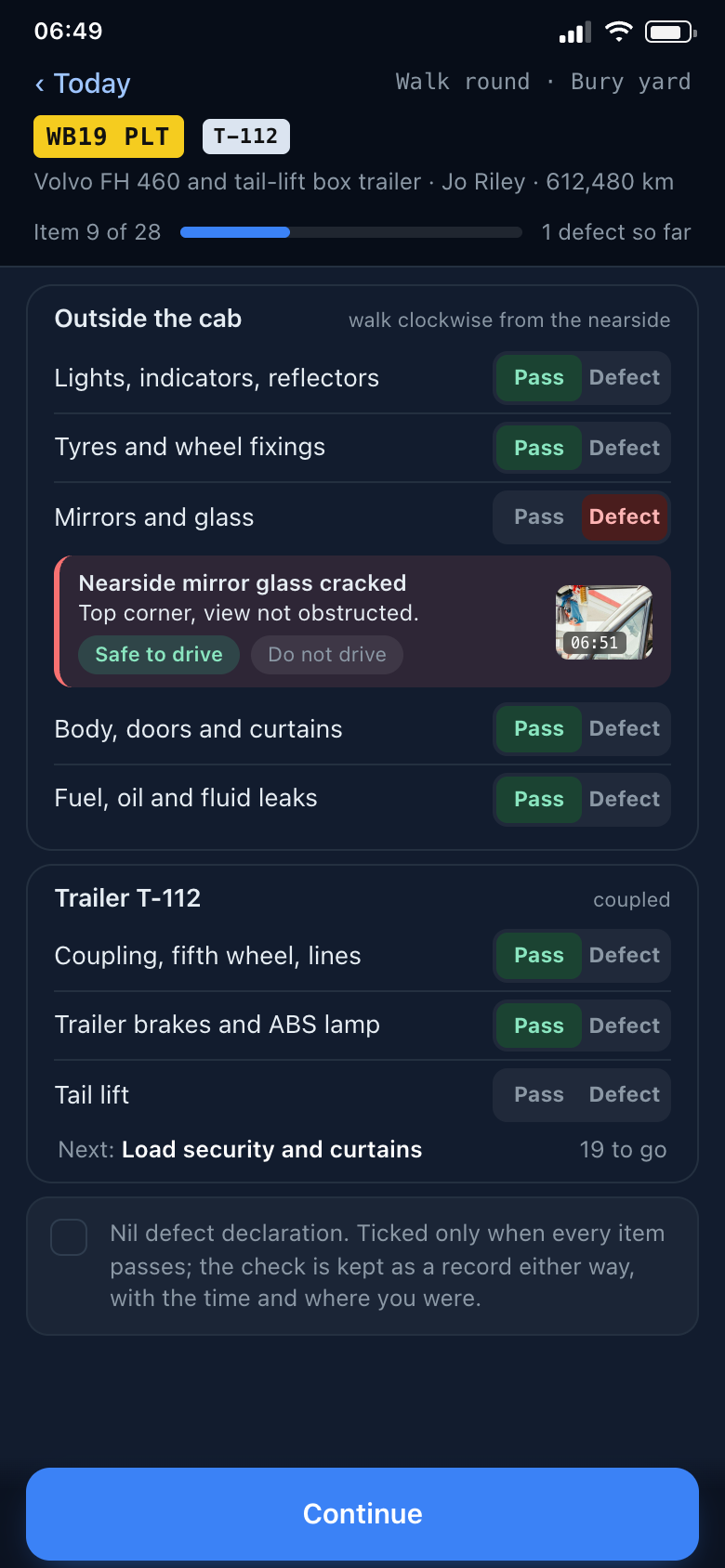
Vehicle or plant checks item by item, pass or defect, with a photo and a note on anything that fails. The defect reaches the workshop when the check is submitted, not when the sheet is found.
Job completion
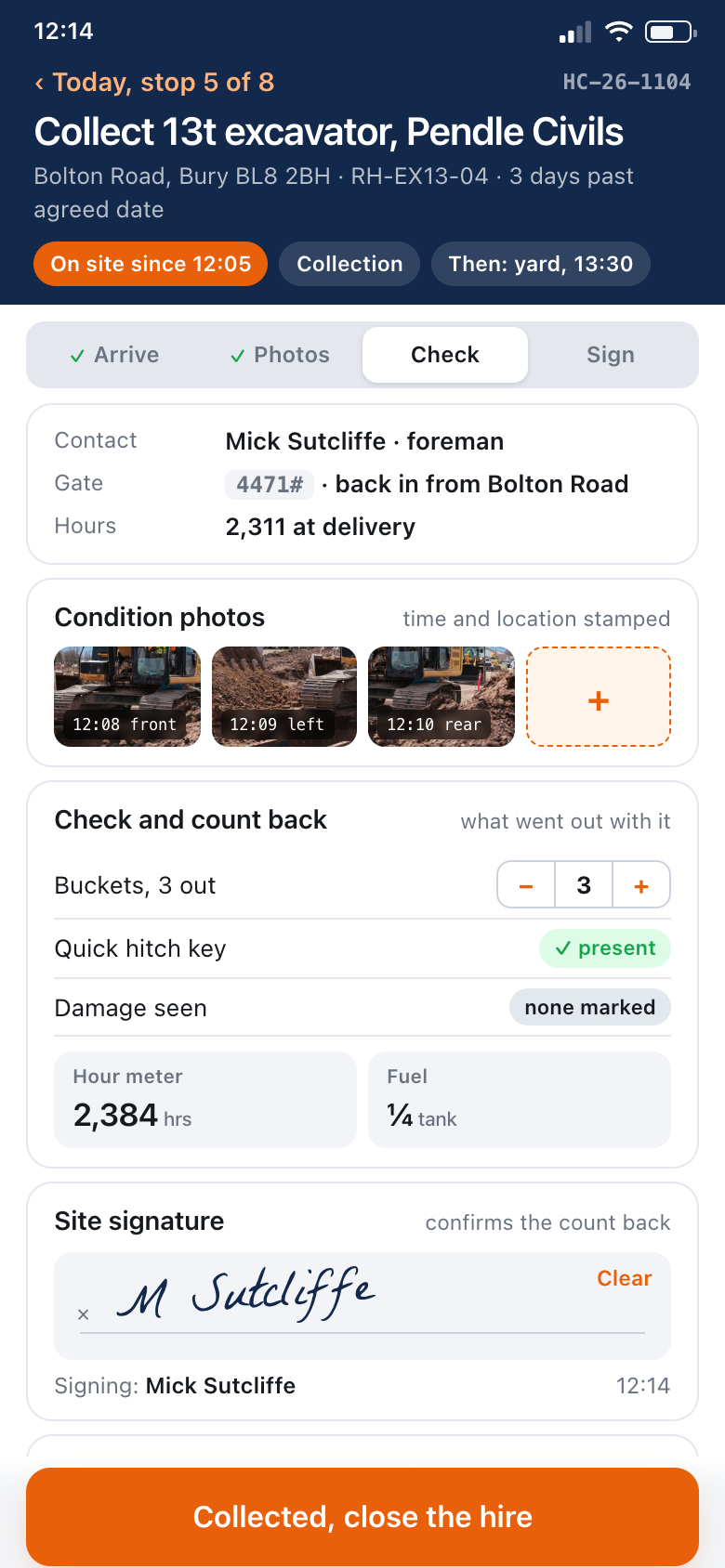
Photos before and after, what was done, how long it took and a customer signature on the screen. The job moves to finished on the office board at the same moment.
Checklists and inspections
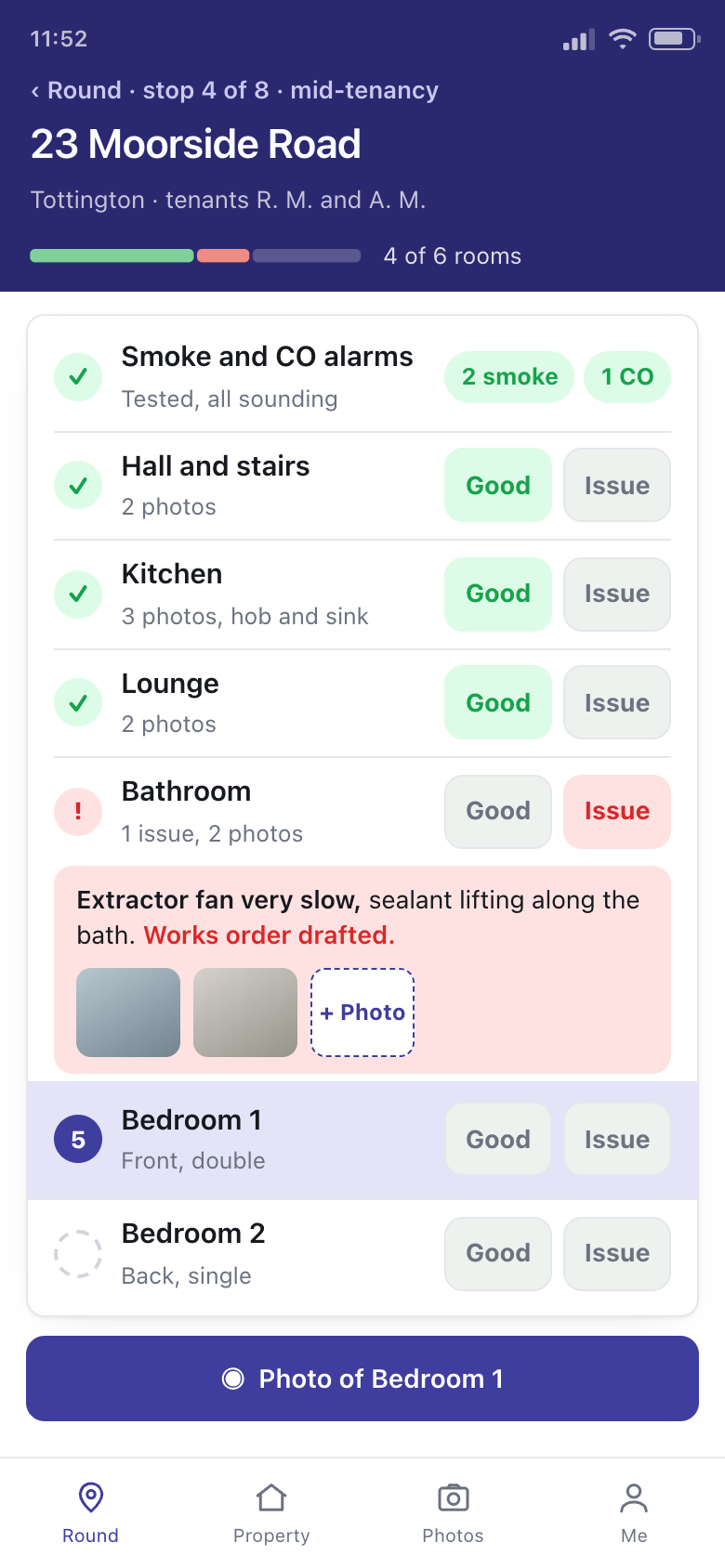
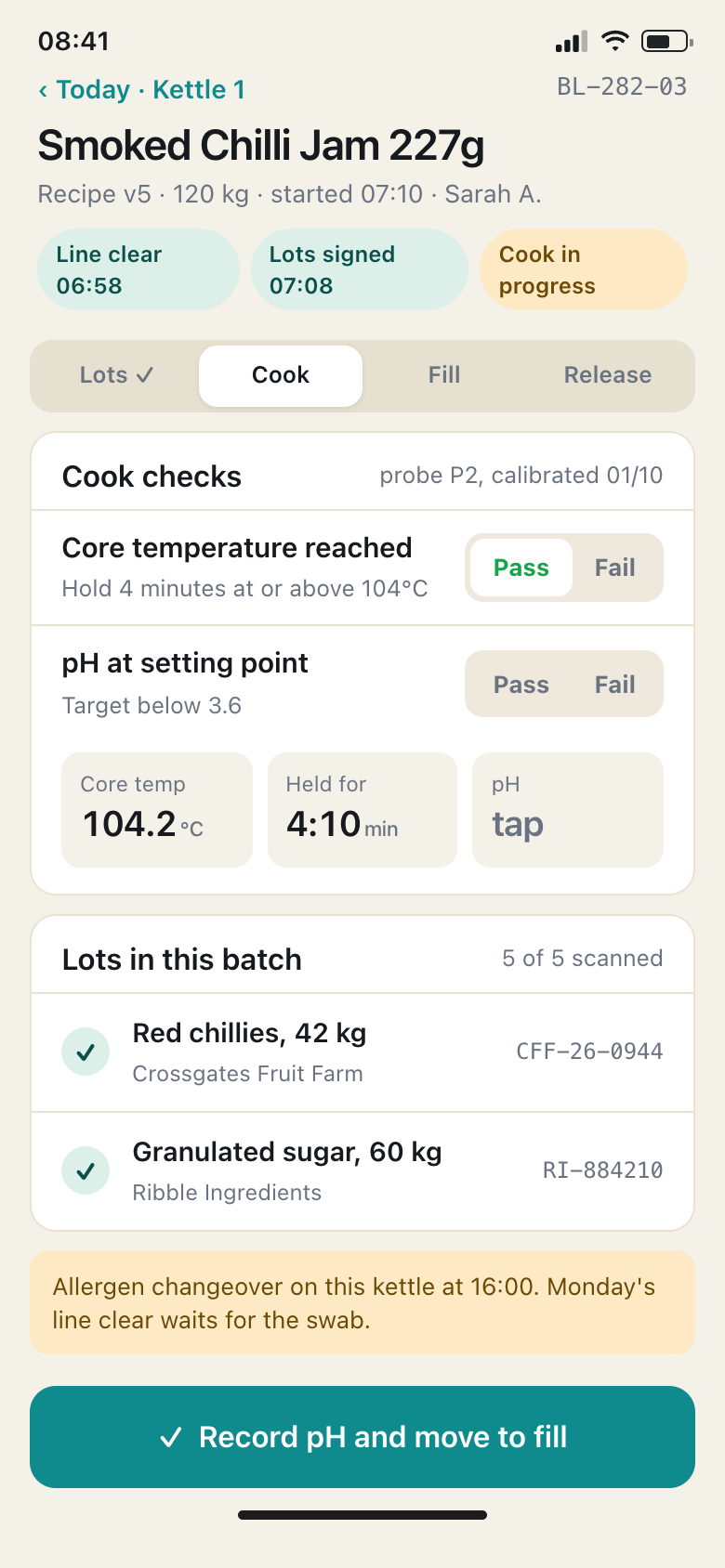
Room by room, asset by asset or batch by batch, in the order the inspector walks it. Required items can't be skipped, and the finished record is dated and signed.
Timesheets
Start, finish and breaks against the job or the site, entered on the day. A manager approves the week from the office rather than from a pile of sheets on a Monday.
Stock used
Parts and materials booked against the job as they're used, so the van stock and the invoice both come out right.
What the screens look like
Four phone screens from our own example systems. The firms, people and places in them are invented. Yours would carry your checks, your stops and your words for things.
How it joins up with the office
The app and the office system are one system with two front ends. When a driver ticks off a stop, the office board shows it done. When the office moves a job to tomorrow, it drops off today's run sheet on the phone. Nobody rings round at four asking how far everyone got.
The paperwork that used to follow the work is already there. A failed check is on the vehicle's history and a signed job is ready to invoice.
The small things are built in too. A new phone is set up by scanning a code rather than typing settings. Clocking on and off a job records where it happened as well as when. A job sheet or certificate can be produced as a PDF on the phone itself and handed over before the engineer leaves. And a store app goes out under your business's own name and icon, not ours.
Where the office runs on something we didn't build, such as accounts or payroll software, the app can usually feed it through an interface or an export, so a finished job doesn't get retyped.
Where it saves time, an AI feature can read what the phone captures: a photo of a meter, a rating plate or a delivery note turned into figures on the record, or a spoken note written up as text, ready for the person to confirm. More on AI and automation.
A web app on the phone, or an app from the store
Both work on iPhone and Android. Which one is right depends on the work, and we'll tell you which we'd pick and why.
When a web app is the right answer
- Run sheets, checklists, timesheets and job sign-offs
- Staff using their own phones, with nothing to install
- Changes reach everyone the moment they're made
- Signal is good enough most of the day
It opens from an icon on the home screen like any other app, and there is no store to wait on.
When a store app is the right answer
- Long stretches with no signal at all
- Heavy use of the camera or a scanner all day
- Things that need to run while the app is closed
- Customers or subcontractors expected to find it in the store
Published to the App Store and Google Play, it gets more from the phone. The listings and reviews that come with it are ours to manage.
When the signal drops
Field work happens in basements and farmyards, so we design for the signal going. Where the work calls for it, the app keeps working without a connection and the job can still be marked done.
What was entered waits on the phone and is sent when the signal comes back, and the app shows that it is waiting rather than pretending it has gone. The office sees it a little later than it would have, but nothing has to be done again.
How much has to work offline is agreed at the start. A run sheet that loads in the morning and sends as it can is simple. Something that has to work for days with no signal is a bigger build, and we'll say so before the price is fixed.
What we handle, and what it asks of you
| Fixed price | Scope, price and dates in writing before anything starts, app and office side together. |
|---|---|
| Store listing | For a store app, we prepare the listing, submit it to Apple and Google, and deal with their review. Both review apps before they appear, which adds a wait we plan into the dates. |
| Updates | When iPhone or Android change, or you need a new check or a new field, we make the change and publish it. A web app updates for everyone at once. A store app goes through review again. |
| Training drivers | We take the people who'll carry it through it before go-live, on their own phones, rather than leaving a manager to explain it. If it needs explaining twice, it's built wrong. |
| Your effort | Not much. A conversation or two, a copy of the sheets people fill in now, someone to try it on a real day, and an hour for the team to be shown it. |
| Hosting and support | The office side is hosted in the UK, backed up nightly and kept thirty days, and checked every few minutes. Support is 8am to 6pm weekdays and Saturday mornings. More on hosting and support. |
How a build runs from a free 20-minute intro call to go-live is on how we work. Field apps come up most in haulage, plant hire, skip hire and for letting agents, and the other systems are on the services page.
Ask about our free Business Systems Assessment
An hour with whoever runs the day to day. Clear recommendations to act on.
We look at how the work actually runs and what it runs on, then send you a list of what we would change, what each change would do for the business, and what it would take. In person or online, whichever suits you. Nothing to pay, nothing to sign.
- One hour
- In person or online
- Recommendations we talk you through
Honest answers
Do our drivers need company phones?
No. The app runs on the iPhone or Android phone they already carry. Some firms prefer company phones so work and personal stay apart, and that works just as well.
Can we have the app without a new office system?
The app has to send its records somewhere. If the office side is something we built, it joins straight on. If it's software you already use, it depends on whether that software lets another system put records into it, and we'll find that out before you commit.
Some of our team aren't good with phones.
That's who it's designed for. Big buttons, few words, the next thing to do at the top, and tapping instead of typing wherever we can. We show everyone on their own phone before go-live.
How long does it take?
A first system is usually live in weeks rather than months, and bigger ones go live in pieces so the most useful screen arrives first. A store app adds Apple's and Google's review, which we allow for in the dates.
Talk to us
Tell us who is out in the field and what they fill in now. That is usually enough for us to say whether an app would help, and what kind.
Ring, 8am to 6pm Monday to Friday and Saturday mornings, or use the form below. Pick what you'd like to keep track of, add a line if you want to, and leave a name and a way to reach you.