Recruitment and staffing
Recruitment and staffing agency software
Candidates, clients, shifts and timesheets on one record. Who is free, whose right to work check runs out next month, which shifts are still open on Friday night, which timesheets the client has signed and what the week made at the margin. Built around how your desk already works, hosted in the UK, and looked after by the people who built it.

What an agency actually tracks
Five records, one worker
- The candidate, their documents and their checks
- The client, their sites and the rates agreed
- The shift or the placement, and who is booked on it
- The hours worked, and who signed them off
- What they were paid, what was charged, and the margin
Five records about the same person in the same week, often kept by three different people.
An agency system answers "who can I put on that shift, and are they cleared to do it" without anybody scrolling a phone book. One worker is one record: their right to work, their licences and cards with the dates on them, the sites they are inducted at, the shifts they have worked and the ones they have turned down.
Most agencies run on a mix: a recruitment package for candidates, a payroll bureau or package for pay, an accounts package for invoices and a lot of texting in between. Each part may do its own job well. What tends to live in someone's head is the joining: which hours are signed, which rate applies at which site, which candidate's check is due before their next booking.
A first system might be the shift board and the timesheets for one desk. The same system later carries permanent placements, several branches, a client login and the margin by consultant, without anyone retyping a name.
What you would be looking at, in the order a week happens
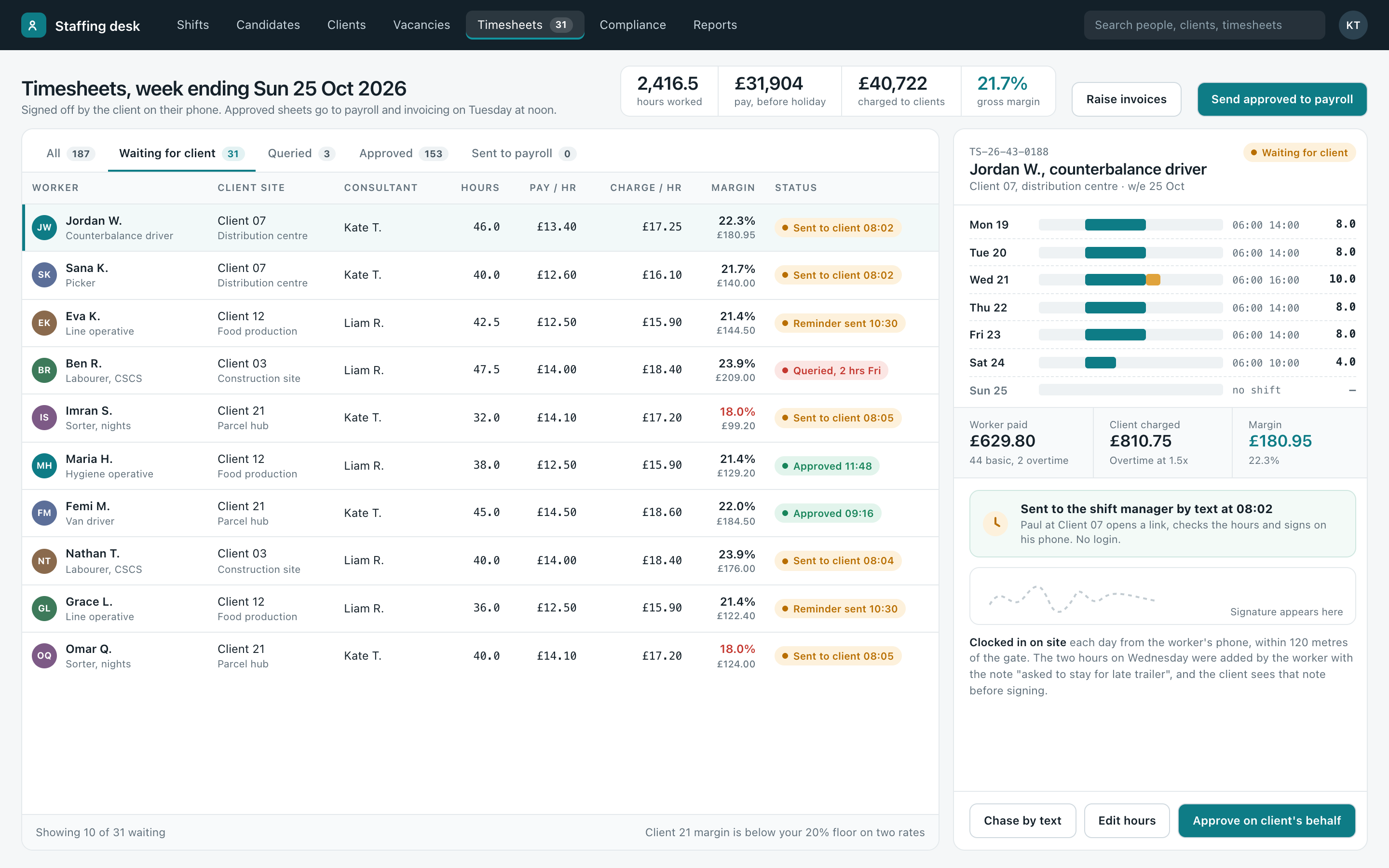
Two screens from our own example system. Every worker, client site, rate and figure in them is invented. Yours would carry your clients, your rate cards and your words for things.
From first contact to paid
| Candidates | Registration on a phone, documents photographed and filed against the person, references and interview notes on the record. A CV can be read in by AI and the fields offered for checking, so nobody types a work history out twice. The consultant still reads it. |
|---|---|
| Checks and expiry | Right to work, ID, licences, cards, DBS where the role needs it and site inductions, each with its date. Amber at thirty days, a text to the worker asking for the new document, and a lapsed check holds their bookings for a person to look at. |
| Clients and sites | Each client's sites, contacts, rate cards, shift patterns and the inductions they require. Client development sits in the same place: calls, visits, proposals and the next follow-up, so the sales side and the delivery side see the same account. More on CRM systems. |
| Vacancies and placements | Permanent and contract roles with a shortlist, the stages each candidate is at, interview times and the fee or rate agreed, alongside the temporary work rather than in a separate system. |
| Shifts and bookings | The board above, with offers sent by text and WhatsApp, replies landing back on the shift, and confirmations and reminders the night before. More on customer messaging. |
| Timesheets | Clock in and out on site, breaks, overtime with a note, client sign-off on a phone, and queries handled on the sheet itself. More on timesheets and sign-offs. |
| Pay and invoicing | Approved hours at the right pay and charge rates, holiday accrued, exported to your payroll and accounts packages in the format they take, rather than retyped from one to the other. |
| Client login | Clients see their bookings, sign timesheets, download invoices and request shifts in their own login. More on customer portals. |
These are parts of one system rather than eight products with logins of their own. The worker on the shift board is the same worker on the timesheet and on the payroll export. More on how the pieces join on one joined-up business system.
We build the records, not the compliance advice. Right to work checks, the conduct regulations and working time rules are your obligations, and the system holds the evidence and the dates in the shape you need them. Check your own position with the Home Office guidance and your own advisers.
Who it suits, and who it doesn't
Where this kind of system earns its keep
- Temporary and contract workers across several client sites
- Checks and licences with dates that matter before a booking
- Timesheets chased by text and signed off on paper or by email
- Pay and charge rates that differ by client, site, shift and role
- Margin by client and by consultant worked out at month end
Where we fit best
An agency with a few placements a month can run on a recruitment package and a diary for a long time. The system earns its keep once the temporary side is busy enough that filling shifts, chasing timesheets and checking rates takes up whole days.
If you already use recruitment software you like for candidates and vacancies, keep it. What usually sits beside it is the shifts, the timesheets and the margin, and that is the part we build, joined to the software where it allows.
And if what you want is one system for the whole agency, front desk to payroll export, that is a real project with a real budget, quoted as one.
The figures come out the other end without a month-end session: hours, pay, charge and margin by client, by site and by consultant, for the week or the year. More on management reporting, and on AI and automation for reading CVs and documents in.
Usually built alongside timesheets and sign-offs, scheduling and run sheets or compliance and inspection records. The rest are on the services page.
Free Business Systems Assessment
An hour with whoever runs the day to day. Clear recommendations to act on.
We look at how the work actually runs and what it runs on, then send you a list of what we would change, what each change would do for the business, and what it would take. In person or online, whichever suits you. Nothing to pay, nothing to sign.
- One hour
- In person or online
- Recommendations we talk you through
Honest answers
- Does this do our right to work checks for us?
- No. The check stays your job and the obligation stays yours. What the system does is hold the document, the date it was checked, who checked it and when it runs out, and stop a worker with a lapsed check being booked without somebody deciding that on purpose.
- We use a payroll bureau.
- Then they carry on running payroll. The approved hours, rates and holiday go to them in the file layout they ask for, once a week, instead of being keyed in from a pile of signed sheets. The same goes for invoices into your accounts package.
- Our clients won't log in to anything.
- They don't have to. Signing a timesheet is a link in a text: open it, check the hours, sign with a finger. Clients who want more, such as seeing every booking or downloading invoices, get a login, and the rest never notice it exists.
- Workers change phone numbers and don't reply.
- Which is why the reply lands on the shift rather than in a consultant's own phone. Everyone on the desk sees who has been offered what and who has answered, and a number that keeps bouncing shows up on the worker's record for somebody to sort.
- Can it handle permanent placements too?
- Yes. Vacancies, shortlists, interview stages and fees sit on the same client and candidate records as the temporary work, so a temp who goes permanent is one record with a history, and the consultant's figures include both.
- How long does it take?
- A first system is weeks rather than months, and bigger ones go live in pieces so the useful part arrives early, often the shift board or the timesheets first. Scope, price and dates are agreed in writing before anything starts.
Talk to us
Tell us how shifts, checks and timesheets are handled now and what you would want to see at a glance. That is usually enough to say whether we can help.
Ring, 8am to 6pm Monday to Friday and Saturday mornings, or use the form below. Pick what you'd like to keep track of, add a line if you want to, and leave a name and a way to reach you.