Systems we build and run
Bespoke staff records and HR systems
Every member of staff on one record: their details, holidays, absence, training, tickets and signed documents, with expiry dates that chase themselves. Joined to your rotas, timesheets and payroll, with an app so staff can see their own.
What it is, and where it fits
Where this kind of system fits
- Builders, contractors and trades
- Haulage, hire and waste firms with drivers
- Field service and engineering teams
- Clinics, venues and hospitality
- Any firm with staff on more than one site
A staff system is the file you would want to open on anybody in the business. Who they are, what they are trained and ticketed to do, what is coming up for renewal, when they are off, and what they have signed, all on one record that the rest of the system can read.
The value is in what it joins up. The rota knows who is on holiday. The job allocation knows who holds the right ticket. The timesheet knows who worked, and the payroll export knows what to pay. Nobody keeps the same facts in four places.
A first version is often the training and tickets register on its own, live in weeks. Holidays, absence, onboarding and the staff app follow when they are wanted.
The teams it is built for
Every firm keeps staff records. What changes is which tickets matter, who approves what, and how much of the team works away from the office.
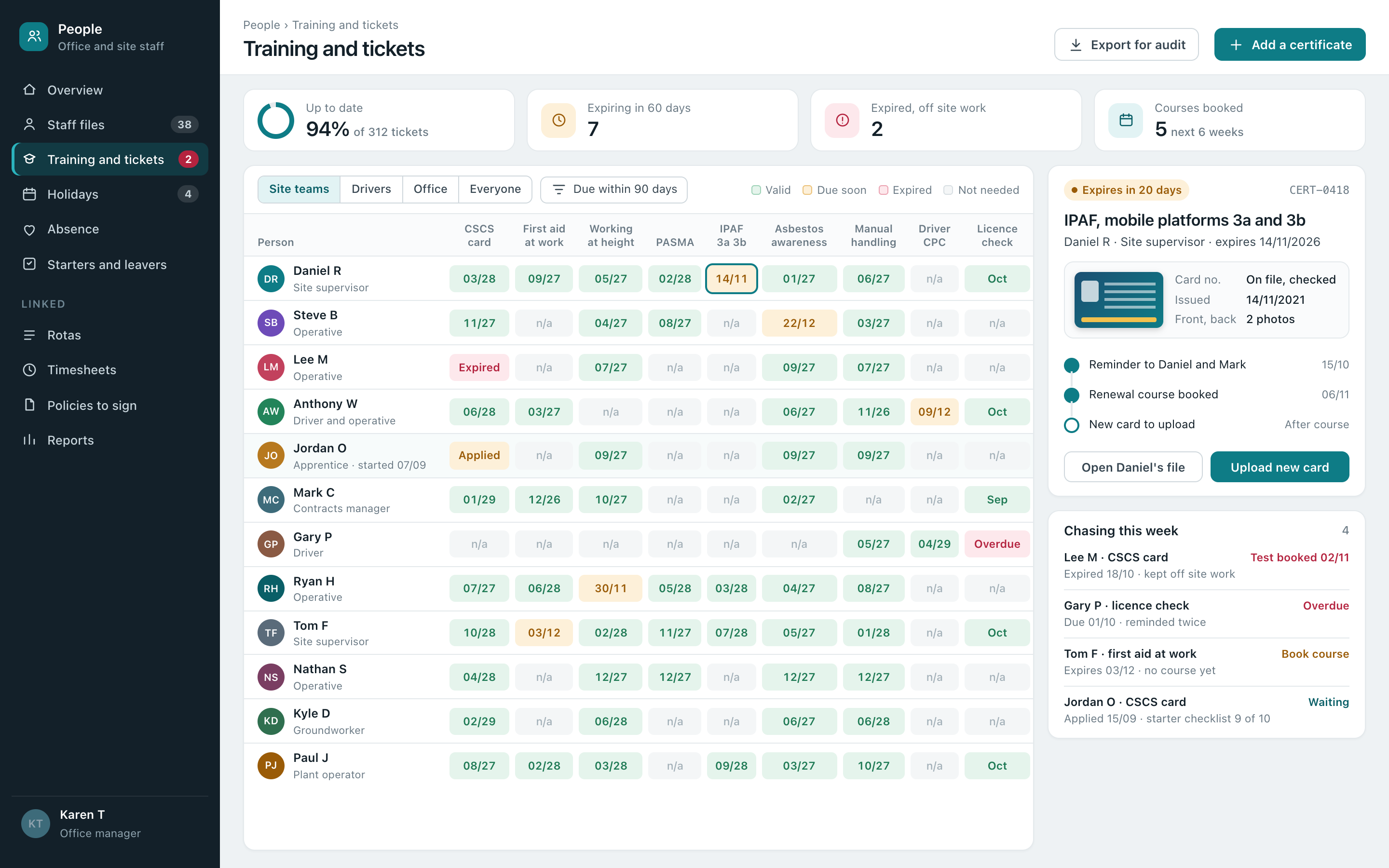
 Site teamsCSCS cards, working at height, PASMA and IPAF, asbestos awareness, with nobody sent to a job their tickets don't cover.
 DriversLicence checks, driver CPC hours, tachograph cards and medicals, each with its own renewal date and reminder.
 Engineers and techniciansGas, electrical and refrigerant qualifications, manufacturer training and competence sign-offs kept against each person.
 Shift and part-time staffAvailability, rotas, holiday worked out from hours, right to work checks and policies signed on a phone.

What it usually grew out of
In most firms one person keeps the staff side running. They know whose card is about to run out, who has holiday left, who still has to sign the new policy and where the scan of everybody's licence is. They keep it all in order through sheer care.
A staff system keeps that care going without depending on one person's memory. Dates chase themselves, requests arrive in one place, and the file is there when a client, an auditor or a main contractor asks for it. Wanting that tidier is reason enough.
- Your tickets, your rules. The training and documents your work needs, which roles need which, and how far ahead to start chasing.
- Approvals that suit you. Holidays approved by a line manager, by the office, or by both, with the rota checked for clashes first.
- The paperwork comes with it. Existing certificates and records are loaded in, so the first day already shows every person's file.
What goes into a staff system
These are the parts most staff systems end up with. Yours has the ones your business actually uses.
| Staff files | Contact details, emergency contacts, role, start date, pay details for payroll, and every document that belongs to the person, kept with who can see what. |
|---|---|
| Training and tickets | CSCS cards, licences, first aid, driver CPC, plant and access tickets, trade qualifications and in-house training, each with its card photo and expiry date. |
| Expiry chasing | Reminders to the person and their manager at the times you choose, courses booked against the renewal, and a clear list of anything already lapsed. |
| Holidays | Allowances worked out from contracts and hours, carry-over, bank holidays, requests from the app, and approvals checked against the rota. |
| Absence | Sickness and other absence recorded with return to work notes, patterns visible to managers, and the figures ready for payroll. |
| Starters and leavers | Onboarding checklists, right to work checks recorded, contracts and policies signed on screen, kit issued, and the same in reverse when somebody leaves. |
| Rotas and hours | Who is working where and when, availability, and hours worked, read by the scheduling and timesheet sides of the system. |
| Payroll export | Hours, holidays, absence and changes passed to your payroll or accounts package each pay period, in the format it expects. |
What it does
Chases renewals before they lapse
Every ticket and certificate has a date, and the system starts asking well before it, so renewals are booked rather than discovered.
Keeps people off work they aren't ticketed for
When a job needs a ticket, only people who hold it in date are offered for it. An expired card is flagged at allocation, not on site.
Handles holiday requests in one place
Requested from the app, checked against the rota and allowance, approved by the right person, and on the diary straight away.
Runs starters through a checklist
Right to work checked, contract and policies signed, tickets uploaded, kit issued, inductions done. Nothing depends on remembering.
Gets documents signed
New policies, handbook changes and toolbox talks sent to the people they apply to, signed on their phones, with who has and hasn't shown at a glance.
Answers an audit in minutes
Training records, card photos and signed documents for a person, a team or a contract, exported in one go when a client or auditor asks.
Feeds payroll each period
Hours, holidays, absence and changes collected from across the system and passed on, so payroll starts from figures already checked.
Keeps private things private
Managers see their own teams, the office sees what it needs, and sensitive notes are visible only to the people allowed to read them.
A staff system is usually one part of one joined-up business system, sharing its people with scheduling and run sheets, timesheets and sign-offs and compliance and inspection records. The rest are on the services page.

An app for the staff themselves
Most staff questions are about their own record. The app answers them directly, on iPhone and Android, and the same app often carries their jobs, rota and hours too.
- Holiday without the form. They see what they have left, pick the dates and send it. They get a notification when it is approved.
- Their own tickets. Every card and certificate with its expiry date, and a photo of a new card uploaded straight from the phone.
- Documents to sign. New policies and induction papers signed on screen, with the signed copy kept on their file.
- Only their own record. Each person sees their own details and nobody else's, and can ask for a change to them in the app.
A week with a staff system running
A contractor with site teams, drivers and an office, as an example. Every one of these steps is set up to suit the business, and changed from the admin screen rather than by asking us.
- Mon
Renewals flagged early
A supervisor's IPAF card runs out in a few weeks. He and his manager were reminded a fortnight ago, and the renewal course is already on the system.
- Mon
A card that has lapsed
An operative's CSCS card expired at the weekend. He is shown as unavailable for site work on the allocation screen until the new card is uploaded.
- Tue
Holiday sorted in minutes
An apprentice asks for a week off in November from the app. The rota shows no clashes, the manager approves it from his phone, and it is on the diary.
- Wed
A new starter
The office sends a new driver their starter pack. Contract, policies and licence check are done on their phone before the first day, and the checklist ticks itself off.
- Thu
A main contractor asks
A client wants the training records for everybody on their site. The office exports the team's cards and certificates in one file and sends it.
- Fri
Payroll from checked figures
Hours, holidays and the one sick day are collected for the period and passed to payroll, with nothing typed in again.
How it gets built, and how it gets run
| Fixed price | Scope, price and dates in writing before anything starts, with what isn't included written as plainly as what is. It doesn't move because the job turned out harder than we thought. |
|---|---|
| Timescale | A first staff system is weeks rather than months, and it usually starts with whichever part takes the office the most time. |
| Moving over | Existing staff details, allowances and certificates are loaded in before the switch, with card photos filed against the right people. |
| Payroll and accounts | Figures pass to the payroll or accounts package you already use, in the format it takes. Your payroll stays where it is. |
| Security | Staff logins with their own permissions, sensitive fields restricted, and a record of who viewed and changed what. Built by a Cyber Essentials certified firm. |
| Hosted in the UK | UK infrastructure, backed up nightly to somewhere that isn't the machine running it, kept thirty days, and checked every few minutes that it's up and answering. |
| Changes | A new ticket type, a different approval route, another checklist. What that covers is agreed at the start, so nobody works it out on the day. |
Free Business Systems Assessment
An hour with whoever runs the day to day. Clear recommendations to act on.
We look at how the work actually runs and what it runs on, then send you a list of what we would change, what each change would do for the business, and what it would take. In person or online, whichever suits you. Nothing to pay, nothing to sign.
- One hour
- In person or online
- Recommendations we talk you through
Honest answers
- There are ready-made HR packages. Why build one?
- If all you need is holidays and a staff list, a ready-made package may well be enough, and we will say so. Bespoke earns its place when staff records need to work with the rest of the business, such as tickets checked when jobs are allocated, holidays checked against the rota, and hours passed from jobs to payroll.
- Does it replace our payroll?
- No. It prepares the figures and passes them to the payroll or accounts package you already use, so payroll keeps doing what it does well.
- Can it hold card photos and scanned documents?
- Yes. Front and back of each card, certificates, signed contracts and anything else, filed against the person with the dates read off it where possible.
- Is staff data kept safe?
- It is hosted in the UK, backed up nightly and built by a Cyber Essentials certified firm. Access is set by role, and sensitive fields can be limited to named people.
- Not all our staff have smartphones.
- That's fine. The office can do everything on their behalf, and the app is there for the people who want it.
- Can subcontractors' tickets go on it too?
- Yes. Subcontractors can have their own records and upload their own cards, so you can check anybody going onto a site, not just your own staff.
- What happens to our data if we stop?
- It is yours. You can export everything at any time, and if you ever leave, we hand it over in a form another system can read.
Talk to us
Tell us how many people you have, which tickets matter, and what the office spends its time chasing. That's usually enough for us to say whether we can help.
Ring, 8am to 6pm Monday to Friday and Saturday mornings, or use the form below. Pick what you'd like to keep track of, add a line if you want to, and leave a name and a way to reach you.