Wholesale and distribution
Software for wholesalers and distributors
Trade accounts with their own prices, orders taken by phone, by a rep or online, picked by bay, loaded by route and signed for on the driver's phone. Stock that knows what is on the shelf, what is on the van and what is on order. Built around how your firm already works, hosted in the UK, and looked after by the people who built it.
What a wholesaler actually tracks
Seven records, one order
- The trade account: its price list, credit limit and delivery day
- The order, however it arrived: phone, rep, web or standing order
- Stock by location: warehouse bays, the cold store and each van
- The pick list, what was short and what was swapped
- The route, the drop order and the van it is loaded on
- Proof of delivery: who signed, when, and the photo
- Returns, credits, and the purchase orders that refill the shelf
Seven records describing the same order, often held in four different places.
A wholesale system answers "has the hotel's order been picked, what was short, which van is it on and did they sign for it" from one screen. One order is one record, from the moment it is taken to the invoice in the accounts package.
Most wholesalers run on an accounts package with a stock module, an order book, a trade price list kept somewhere else and drivers bringing paper delivery notes back at the end of the day. It works, and it got the business to where it is. The question is how much of the day goes on keying an order twice, chasing a signature or finding out at the van that a line was short.
A first system might be the order desk and the pick list. The same system two years on can carry online trade ordering, every route on the drivers' phones, returns and the reordering that keeps the shelves full.
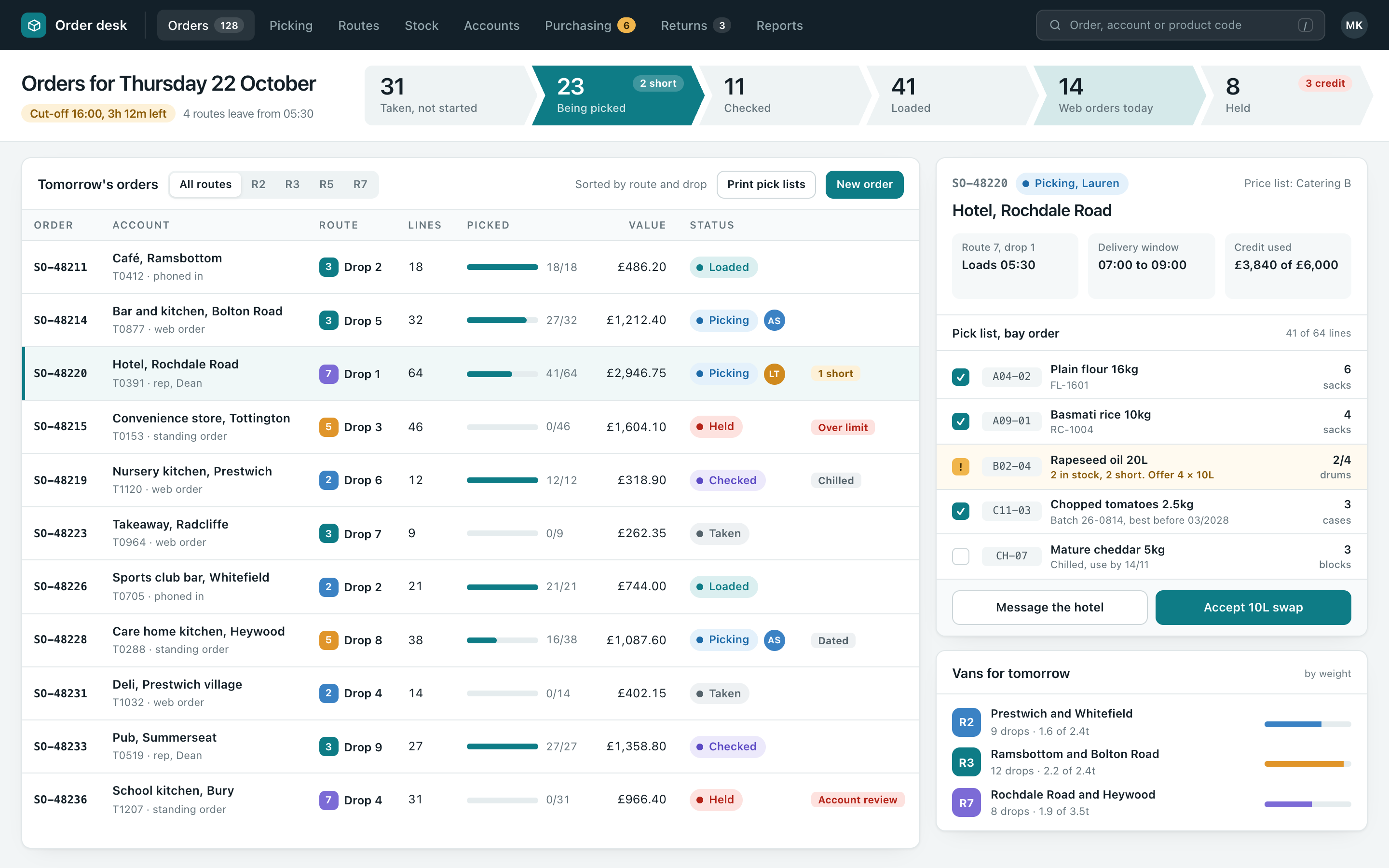
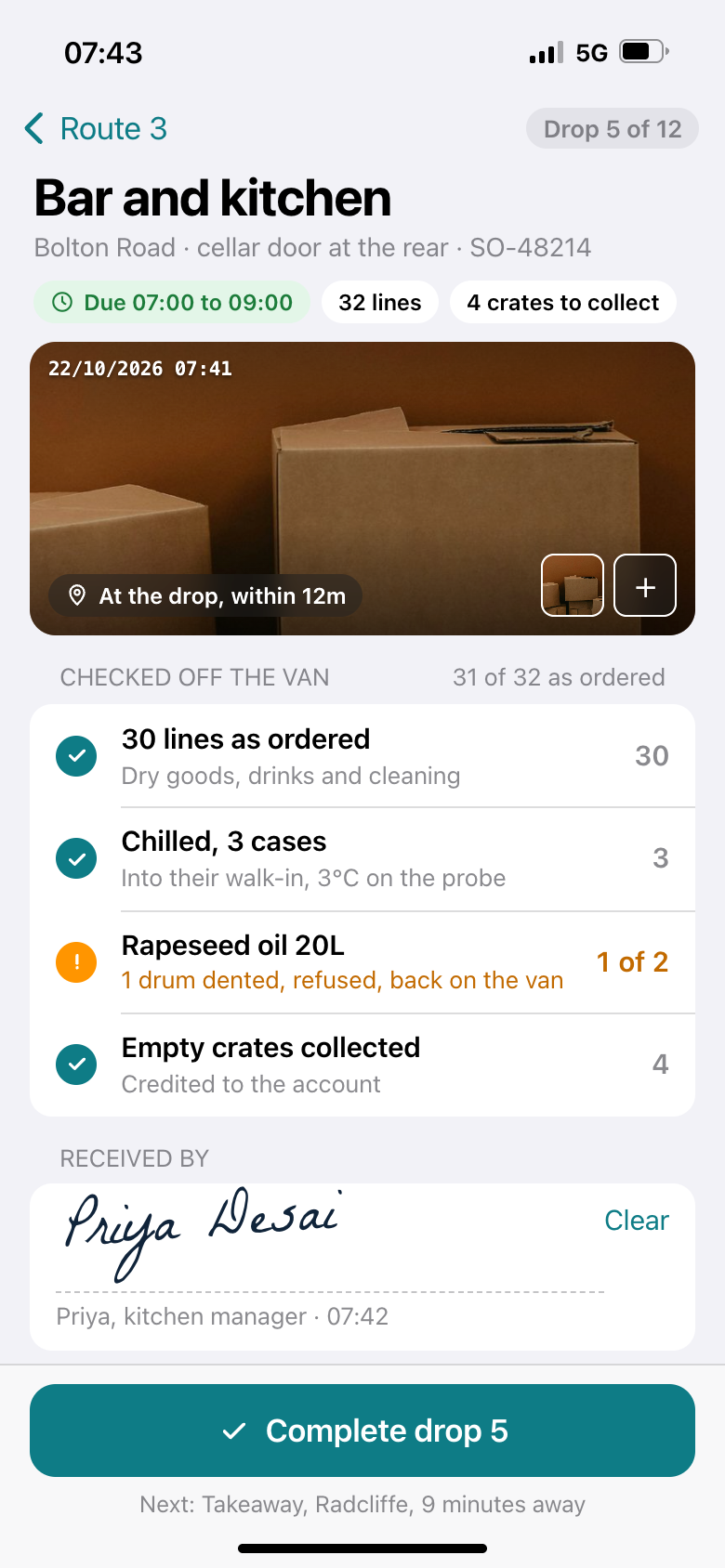
What you would be looking at, from the order desk to the drop
Two screens from our own example system. Every account, product, driver and figure in them is invented. Yours would carry your product codes, your bays, your routes and your words for things.
The day to day, in more detail
| Trade accounts and price lists | Each account carries its own price list or discount, its credit limit and terms, its delivery days and its drop notes. Contract prices, promotions and price rises are set once with a start date and apply to every order from then on. |
|---|---|
| Orders, however they arrive | Taken on the phone by the office, on a tablet by a rep, online by the customer or as a standing order that repeats each week. They all land in the same order book with the same checks. |
| Online trade ordering | Customers log in, see their own prices and their usual order, reorder in a few taps and see what was delivered and invoiced. More on customer portals. |
| Stock by location | What is on the shelf in each bay, in the cold store and on each van, what is allocated to orders and what is on order from suppliers, so the number on the screen is the number you can sell. More on stock and materials. |
| Picking and despatch | Pick lists in bay order, scanned or ticked on a handheld or a phone, shorts recorded as they happen, a check before loading and the order marked onto its van. |
| Routes and proof of delivery | Drops in route order on the driver's phone, with drop notes and the delivery window. Signature, photo, time and location captured at the door, and the delivery note emailed to the customer before the van has left. |
| Returns and damaged goods | Returns booked against the original order and the reason recorded, the credit raised and the stock put back as saleable or damaged. Damage can be photographed or filmed on the phone and read for you. More on AI video analysis. |
| Purchasing and reordering | Reorder levels per product and location, a suggested order to each supplier from what is selling, purchase orders sent from the system and goods in checked against them. |
| Invoices and the accounts package | Invoices raised from what was delivered, not what was ordered, and passed to your accounts package with payments coming back, so credit limits are worked out on today's figures. More on joining up your systems. |
Batches, dates and recalls, plainly
For food, drink and anything else with a batch or a date on it, the record that matters is which batch went to which customer. The system holds it as the goods move, rather than asking somebody to piece it together afterwards.
| Goods in | Supplier, batch and best before or use by date recorded at goods in, with the temperature for chilled and frozen deliveries. |
|---|---|
| Picking by date | The pick list sends the picker to the oldest date first, and stock nearing its date is flagged so it can be sold or moved on in time. |
| Which batch went where | Each line on each delivery carries the batch it was picked from, so a supplier's recall becomes a list of customers and quantities in a few seconds. |
| Chilled deliveries | Temperatures taken on the van and at the drop, recorded against the delivery rather than on a clipboard in the cab. |
We build the records, not the compliance advice. Check your own food safety and traceability obligations with your local authority or the relevant body.
Who it suits, and who it doesn't
Where this kind of system earns its keep
- Food service and catering suppliers, drinks wholesalers, trade counters and builders' merchants, cleaning and janitorial suppliers, packaging distributors
- Somewhere between 5 and 100 people, with your own vans out most days
- Trade customers on their own prices and credit terms
- Orders arriving by phone, rep and online, all needing the same checks
- Stock with batches and dates, or stock spread across vans and sites
Where we fit best
A wholesaler with one van and a few dozen accounts can run happily on an accounts package for a long time. The system earns its keep once several people take orders, the vans are out every day and the stock figure has to be right before the order is promised. A first step can be the pick list and proof of delivery on their own.
If your accounts package already runs the stock and invoicing well, keep it. We build the order desk, the picking, the driver's app and the customer login around it and join the two, so nobody types an order in twice.
These are parts of one system rather than separate products with logins of their own. The account on the order desk is the same account on the driver's drop, the online login and the invoice. More on how the pieces join on one joined-up business system.
Where it saves time, we build in AI features too: a customer's emailed order or a supplier's delivery note read into the record and checked before it is accepted, or a reorder suggested from what is selling. More on AI and automation.
Usually built alongside stock and materials, customer portals, scheduling and run sheets, iPhone and Android apps for drivers or management reporting. Producers who make what they sell will find food and drink producers closer to home, and the rest are on the services page.
Free Business Systems Assessment
An hour with whoever runs the day to day. Clear recommendations to act on.
We look at how the work actually runs and what it runs on, then send you a list of what we would change, what each change would do for the business, and what it would take. In person or online, whichever suits you. Nothing to pay, nothing to sign.
- One hour
- In person or online
- Recommendations we talk you through
Honest answers
- Our accounts package already has a stock module.
- Then it can stay the place the stock value and the invoices live. What usually sits outside it is the order desk, the pick list, the vans and the proof of delivery. We build those and join them to the accounts package, so stock moves and invoices flow into it without being keyed twice.
- Can customers order online at their own prices?
- Yes. Each customer logs in and sees their own price list, their usual order and their delivery day, and the order lands in the same order book as the ones taken by phone, with the same credit checks. They can also see what was delivered, who signed for it and their invoices.
- Our drivers are on the road all day with patchy signal.
- The driver's app keeps working without a signal. Signatures, photos and checks are stored on the phone and sent when it finds one, and the driver can see what is still waiting to go. The office sees the drop as delivered when it arrives.
- Can it handle barcodes and scanners?
- Yes. Picking and goods in can be scanned on a handheld scanner or a phone's camera, against your own codes or the barcodes already on the products. Where a firm ticks rather than scans, it works that way too.
- How long does it take?
- A small system can be live in days and a bigger one in weeks rather than months, and bigger ones go live in pieces so the useful part arrives early. The driver app is published to the App Store and Google Play under your own name. Scope, price and dates are agreed in writing before anything starts, with what is not included written as plainly as what is. More on that in how we work.
- Where does the data live?
- On UK hosting, backed up every night with the backups kept for thirty days, and monitored every few minutes. The details are on hosting and support.
Talk to us
Tell us how orders reach you now, how they get picked and onto the van, and what comes back from the drop. That is usually enough to say whether we can help.
Ring, 8am to 6pm Monday to Friday and Saturday mornings, or use the form below. Pick what you'd like to keep track of, add a line if you want to, and leave a name and a way to reach you.